Data sources
Calling OPC UA methods
Besides reading values and writing to OPC UA, Peakboard can also call OPC UA methods that a server exposes through its object nodes. Two Building Blocks are available for this: Call method calls a method without reusing its result, and Call method with return value calls a method and returns its result so you can keep working with it in the script.
Attention
This requires at least one previously created OPC UA data source. The Building Block calls the method in the context of that connection.
Find the OPC UA blocks
Open the Building Blocks editor for any script (for example a [Button] click, a Timer or a Global event) and make sure [Block Mode] is active. Use the block search (1) to filter for OPC UA. The blocks live under FUNCTIONS → Publish to external systems → OPC UA (2).
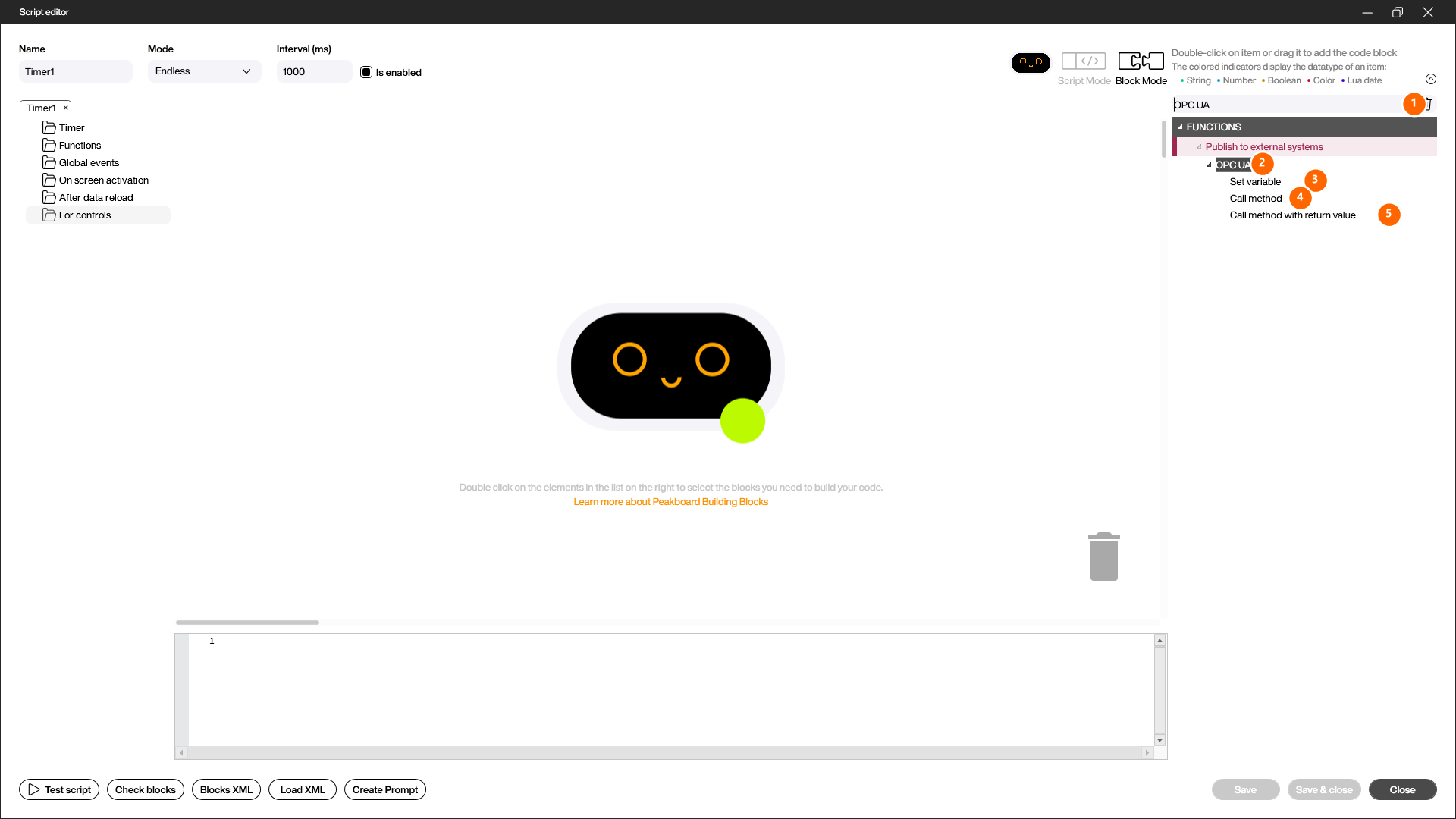
- Set variable (3): writes a value to a writable OPC UA variable (see Writing to OPC UA).
- Call method (4): calls an OPC UA method exposed by an object node on the server, without using a return value.
- Call method with return value (5): calls an OPC UA method and returns its result, so you can reuse the returned value — for example to store it in a variable.
Add the Call method block
Double-click Call method (or drag it onto the canvas). The block starts in a minimal state with only the connection row.
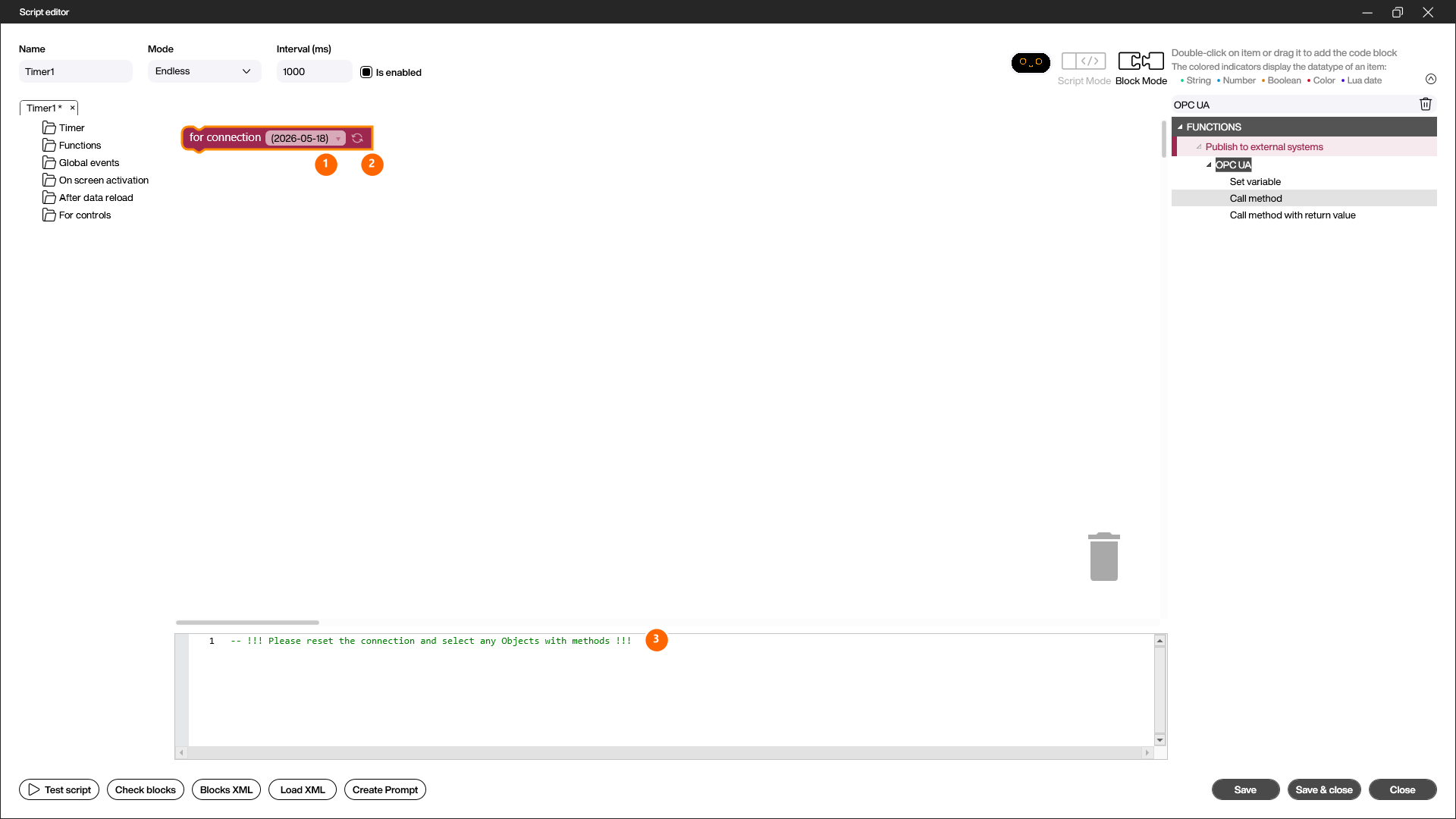
- for connection (1): the OPC UA data source in whose context the method is called. Pick the connection from the dropdown.
- Reset / select method (2): the refresh icon opens the node browser so you can choose the object node and the method.
- As long as no method is selected, the generated code (3) shows the hint
-- !!! Please reset the connection and select any Objects with methods !!!.
Choose the method
The refresh icon opens the [Select OPC UA nodes] dialog — the same node browser used by the data source. It shows the address space of the connected server.
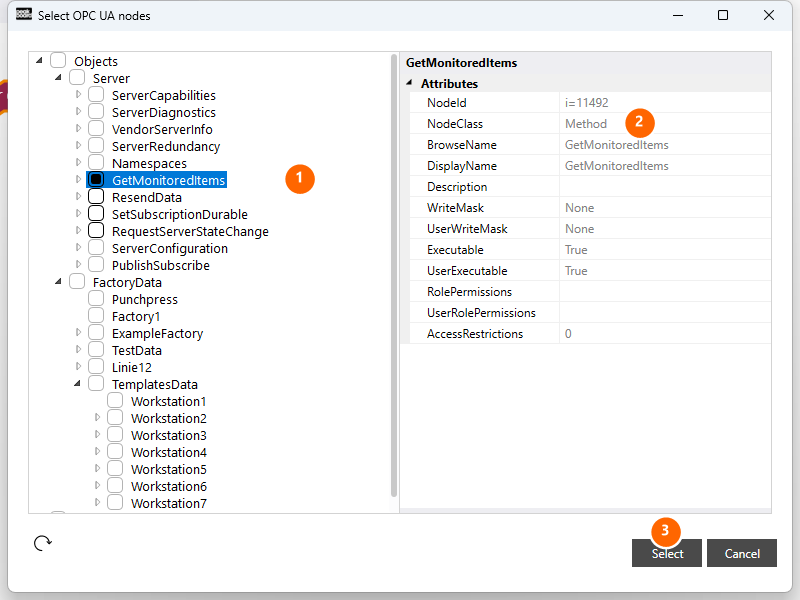
- Pick a method (1): expand the tree and tick the checkbox of the method you want to call. Methods sit under the object node that exposes them — standard methods, for example, live under the Server node.
- Attributes (2): use the attributes pane to confirm you picked the right node. A callable method has
NodeClass= Method andExecutable= True. - Select (3): confirm the choice and return to the editor.
The block adapts
Once a method is selected, the Call method block rebuilds itself: it now shows the method and — if the method expects input arguments — one typed input socket per argument.
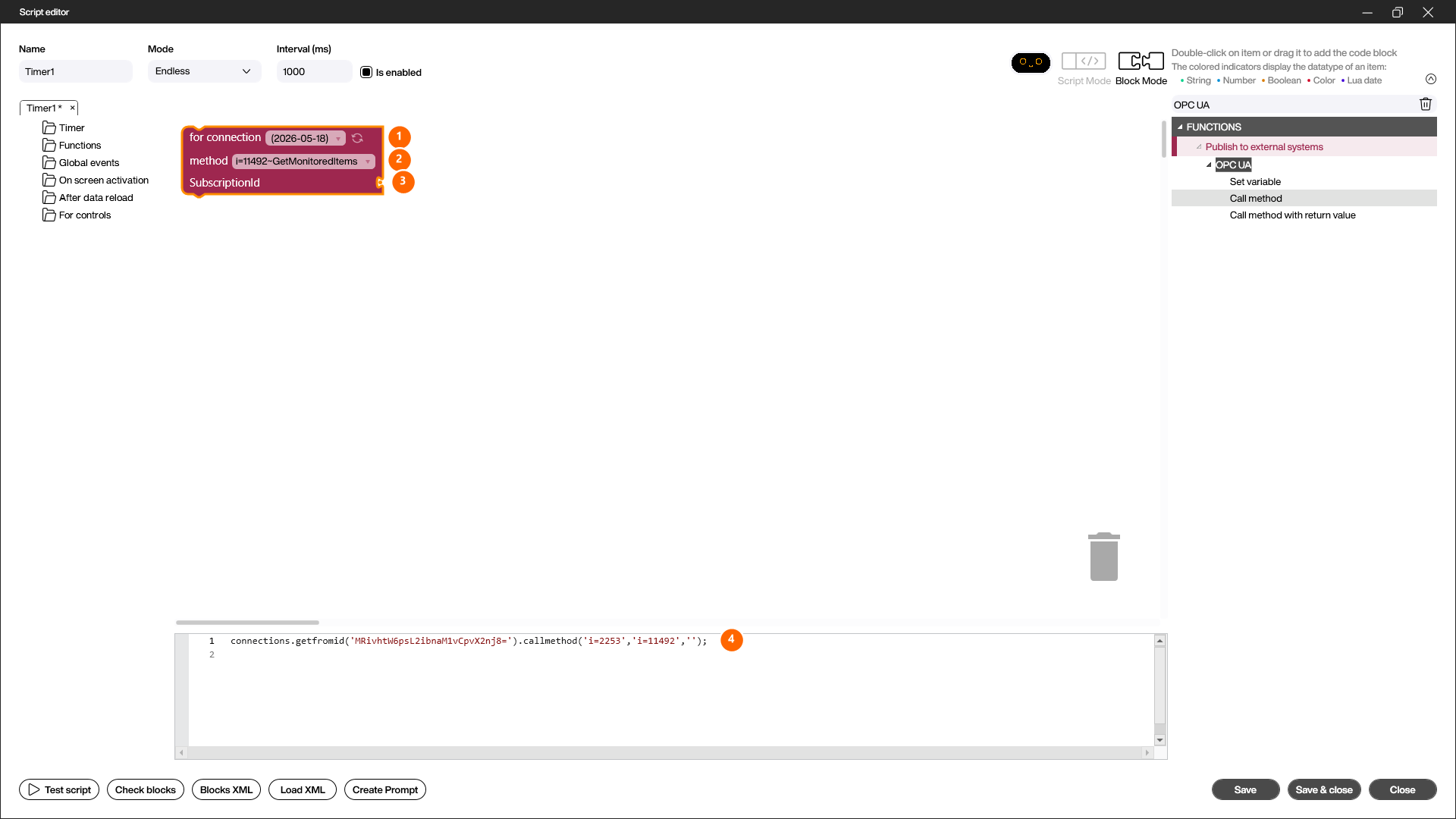
- for connection (1): the OPC UA connection used to call the method.
- method (2): the method that was picked, shown with its NodeID and name. Use the dropdown to switch to another method of the same connection.
- Arguments (3): for every input argument of the method (in the example
SubscriptionId) the block exposes a typed socket. Plug a value, a [Get value] block or any matching expression into it. - Generated code (4): the block produces the matching
callmethodcall automatically, for exampleconnections.getfromid('…').callmethod('i=2253', 'i=11492', ''). The first argument is the NodeID of the object node, the second the NodeID of the method, followed by the method arguments.
Call method with return value
The Call method with return value block works exactly like Call method — connection, method and arguments are selected the same way. The difference: it returns the method’s result.
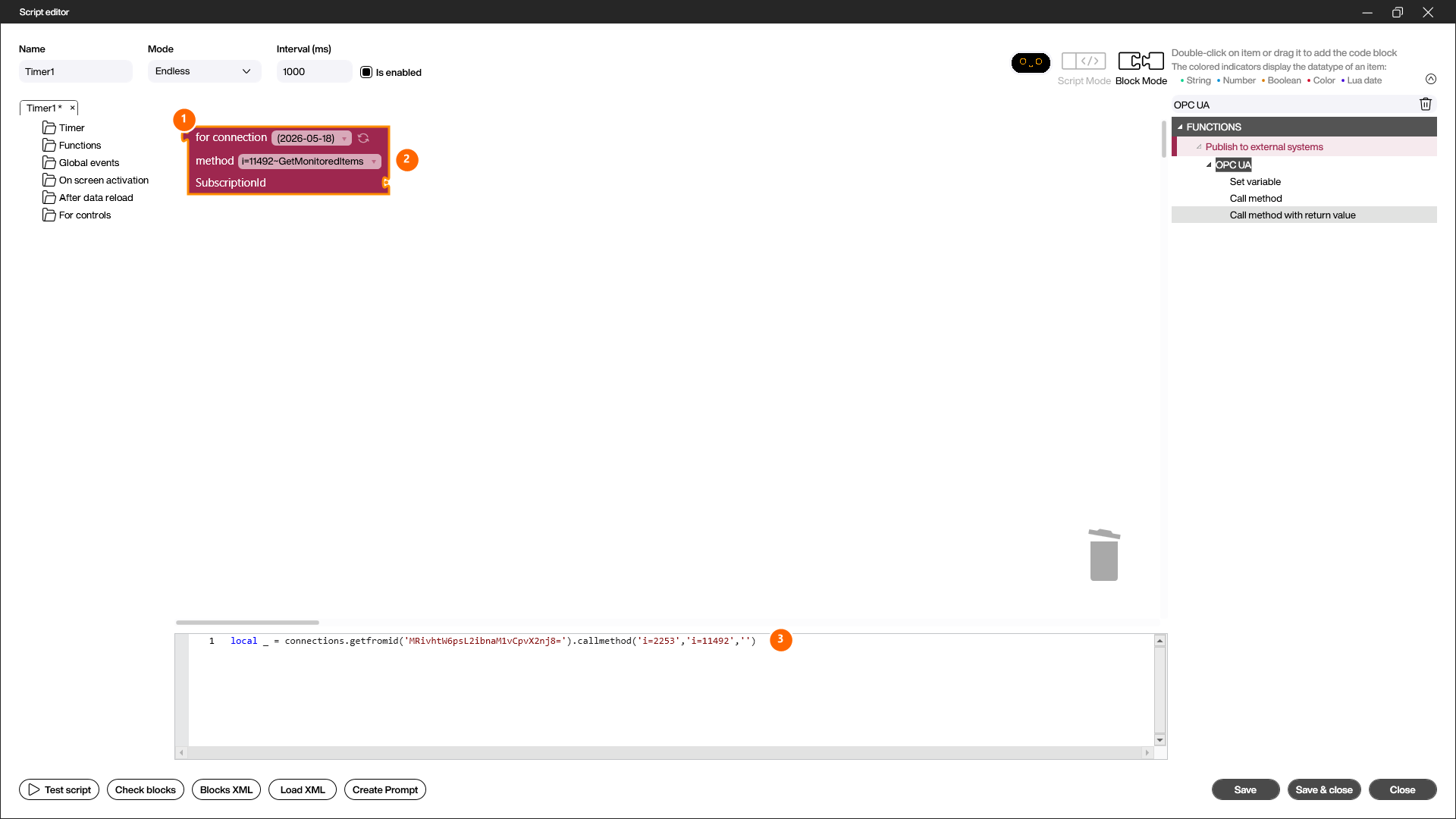
- Return-value output (1): the socket at the top left of the block emits the method’s result. Connect it for example to a Set value block to store the returned value in a variable.
- Connection, method and arguments (2): are selected just like in the Call method block.
- Generated code (3): the generated code now starts with
local _ = …, meaning the result of thecallmethodcall is captured and can be reused.
Calling from a script
The same call is also available directly in script code, which is useful for advanced scenarios:
-- without a return value
connections.getfromid('EncodedConnectionKey').callmethod('ObjectNodeId', 'MethodNodeId', 'Arguments')

-- with a return value
local result = connections.getfromid('EncodedConnectionKey').callmethod('ObjectNodeId', 'MethodNodeId', 'Arguments')
You can find the NodeIDs of the object node and the method in the “NodeID” field of the browse dialog of the OPC UA data source. A method is identifiable by NodeClass = Method.
Note
The NodeID can also be determined using UaExpert or a similar tool.
For the Peakboard Script Engine all numbers are equivalent and processed as “double”. When you pass numeric arguments to a method, convert them with the matching functions (toint32(), toint16(), …) to the OPC UA data type the server expects. The Call method Building Block handles this conversion for you through its typed input sockets.