Peakboard hub
Version History
2.3.3.0 (19.10.2026) Download
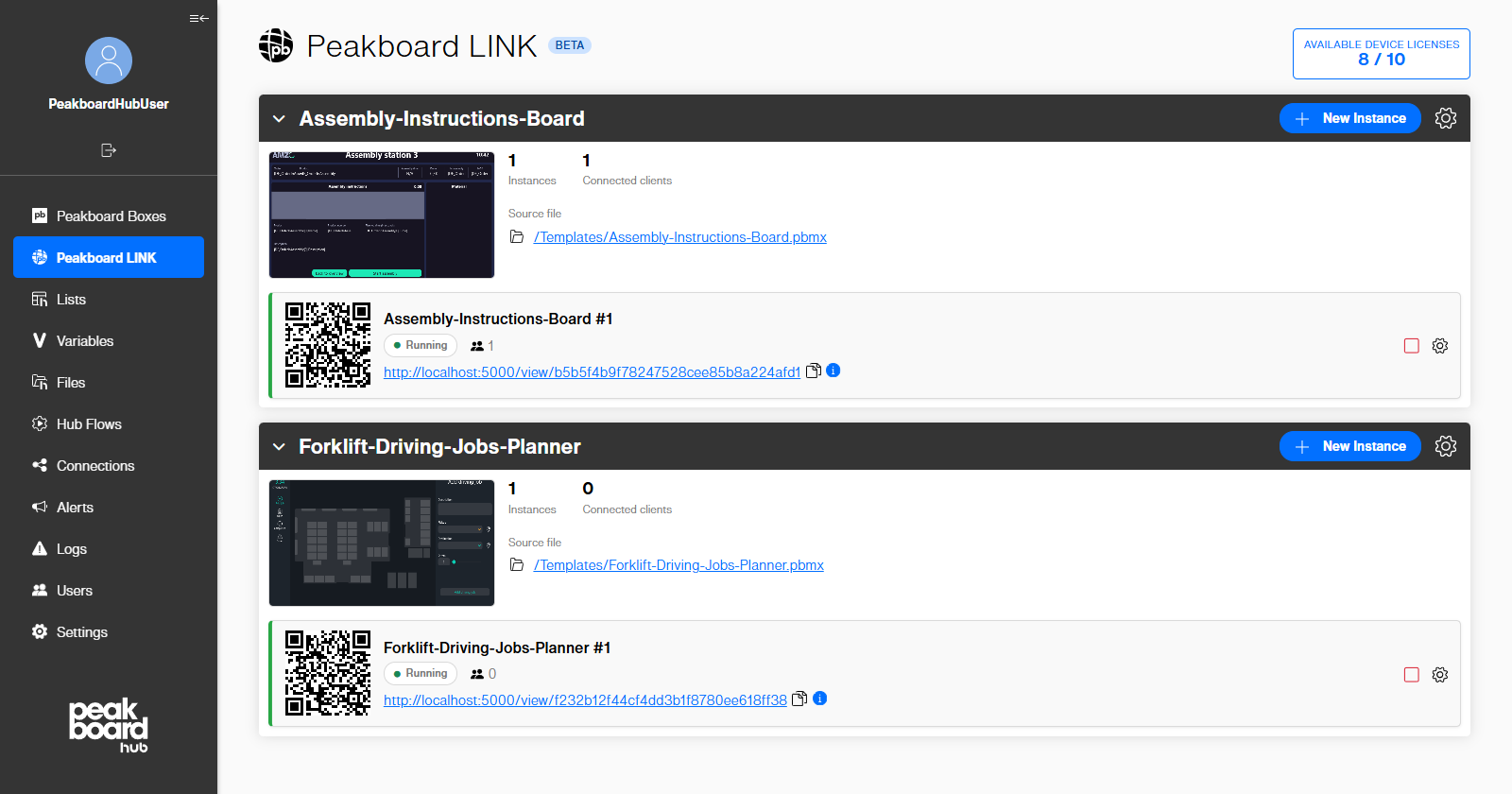
With Peakboard LINK, Peakboard applications from the Hub file storage run directly in a web browser. Each instance has its own board link and QR code, and you can see at a glance how many clients are connected.
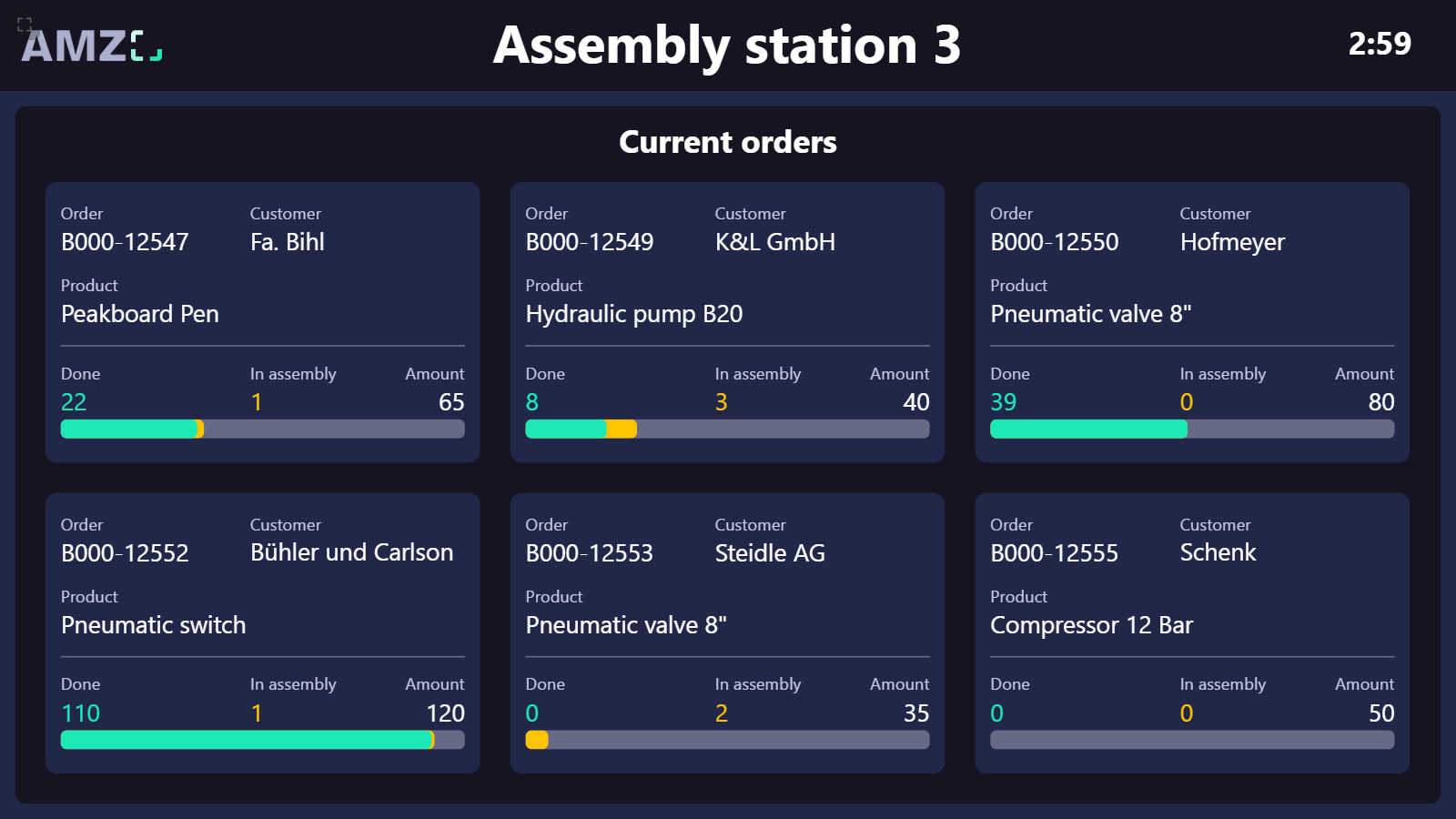
Any licensed screen with a web browser can open the board link and shows the running application.
Peakboard LINK
Added Peakboard LINK. Run Peakboard applications from the Hub file storage directly in a web browser, without a Peakboard Box.
Added the ability to create several instances per Peakboard LINK, each with its own board link and QR code.
Added an optional 5-digit access code per instance to restrict who can open a board.
Added an overview of the connected clients, the resource usage, and the logs of each instance.
Added LINK device and user licenses, which can be assigned directly in the Hub.
Added a notification and an ‘Update project’ action when the source file of a Peakboard LINK has a newer version.
Installation and operation
The Peakboard Hub and the Peakboard Hub API now run as Windows services and no longer require IIS. When updating, the existing IIS configuration, including the HTTP port and the HTTPS certificate, is migrated automatically.
Added the Peakboard Hub Configurator. It lets you manage the services, ports, HTTPS certificate, database connection, and authentication settings without manually editing the appsettings.json file.
Reworked the setup with a clearer structure and a grouped component selection.
Added the ability to set up the database on a remote SQL Server using SQL authentication.
Added the ability to initialize an existing, empty database.
Added the option to create a database backup before an update, so a working database is still available if the update fails.
Added the option to create the necessary firewall rules for the configured ports.
The required .NET runtime is now detected automatically and installed if it is missing.
The SQL Server Express installation is now skipped if the same version is already installed.
Changed the default installation folder to C:\Program Files\Peakboard\PeakboardHub and the default data folders (files, Hub Flows, box updates, Peakboard LINK) to C:\ProgramData\Peakboard\PeakboardHub. When updating, you can choose whether to move existing folders.
The uninstaller now works correctly with multiple Hub installations on one machine.
The uninstaller now also removes files from previous Hub versions, as well as itself and the installation folder if it is empty.
Fixed an issue where the setup could be continued without creating or selecting a database user.
Fixed an issue where the setup seemed to be stuck while installing SQL Server Express. The progress bar now only takes the selected steps into account.
Fixed an issue where an error message was shown when setting up the Hub with a custom database.
Peakboard Boxes
Added tabs (Overview, Settings, Updates, Application, Scheduling) to the box groups in the tile and list view of the box overview.
Added ‘Reset’ and ‘Restart’ buttons to the system tab of the box details page, including a confirmation warning.
Added a warning when uploading an application that requires an Enterprise license to a box with a Professional license. For uploads running in the background, the warning is written to the log.
Added the ability to disable an encrypted box connection.
Improved the runtime update so that only the relevant runtime versions are offered. The fourth digit of the runtime version, which is used for Designer-only hotfixes, is no longer considered.
Long box names are now shortened, so they no longer break the layout.
Boxes without a name are now shown as ‘n/A’ instead of breaking the box overview.
Orphaned boxes that are no longer assigned to any user group are now removed from the database.
Fixed an issue where users with screenshot-only access could see box information like the IP address, runtime version, and box user, as well as the Web Access and delete buttons. Live updates now also work for these users.
Fixed an issue where uploading a runtime update file failed because of the file size limit.
Fixed an issue where the application of a box group was not updated in the UI when switching to another group.
Fixed an issue where the dropdown selection was not updated after uploading a .pbmx file from the local file system.
Fixed an issue where the selection was not saved when uploading an application from the Hub files to a box. The upload button is now disabled until an application is selected.
Fixed an issue where the dialog for updating the credentials of a deactivated box gave no feedback and showed an incorrectly styled password input.
Fixed an issue where the box initialization dialog was cut off.
Fixed an incorrect tooltip of the button for encrypting the box connection.
Peakboard Hub Lists
Added the ability to use a Hub list as validation for the cells of a list column.
Added the ability to select multiple lists in the list explorer (with Ctrl and Shift) to group, delete, or export them together.
Added the ability to select multiple rows, or all visible rows, and delete them at once.
List imports now run in the background. The list shows an updating status until the import is completed, and you are notified once it is finished. While the import is running, the list cannot be changed.
Replaced the list grid with a new implementation.
The CSV import now validates column titles. Spaces are no longer allowed in list names and are replaced with ‘_’ in column names.
When switching between lists, the data of the previous list is now removed before the next list is loaded.
Improved the performance of database access, especially for continuous list read and write operations.
Fixed an issue where the tick size of a number constraint was ignored when entering values.
Fixed an issue where editing a list was reset when the data was changed externally at the same time, e.g. by a Hub Flow.
Fixed an issue where an InternalServerError occurred when many Hub data sources were loaded at the same time.
Peakboard Hub Variables
Reworked the variables page into a table view with filter and sorting options.
Added a confirmation dialog before deleting a variable.
File Manager
Reworked the file manager UI.
Added a ‘Run Application’ button to upload an application directly to a single box or a box group. The ‘Upload’ button has been renamed to ‘Add File’.
Added a setting for the maximum number of versions stored per file. The default value is 10 (unlimited for updates). When the limit is reached, the oldest version is deleted.
Added a back button to leave the full screen view.
The image preview now keeps the aspect ratio of the image instead of always using a square format.
Hub Flows
Added a link from a flow step to its output list, and from a flow list to its Hub Flow.
Moved the download of a flow project to the context menu.
Fixed an issue where Hub Flows crashed when several flows were started at the same time.
Fixed an issue where writing to a Hub Flow output list failed with an ‘Incorrect syntax’ error.
Fixed an issue where the Hub Flows folder was not moved when it was changed in the settings.
Removed a false warning that was shown when a flow was started before its previous run was completed.
Test system
Users and their user settings are now also copied to the test system.
Added the option to keep lists that only exist on the test system during the synchronization. Existing lists are updated, and missing lists are created.
Added a warning when enabling the test mode, since data may be lost depending on the settings of the main Hub.
Users
Fixed an issue where users who had subscribed to push notifications could not be deleted.
Logs
If the MQTT broker port is blocked, the error is now logged at startup and then only once per day instead of every 10 seconds.
Alerts
Fixed an issue where solving an alert sent the email notification a second time.
Fixed the layout of the empty state of the email content tile in the alert settings.
General
Added notifications for long-running operations, such as list imports, which are shown once the operation is finished.
If the database cannot be reached when the Hub starts, the Hub now keeps running, shows an error page, and recovers automatically once the database is available again.
Old browsers that cannot display the Hub now show an error message instead of a blank page.
The login page now supports browser features like saving credentials.
Added a back button for smaller screens.
Replaced the remaining third-party UI components with Peakboard’s own controls.
Unified the design of buttons, links, input fields, info boxes, and colors across the Hub.
Improved security by parameterizing all database queries.
Fixed the text alignment in confirmation dialogs.
2.2.5.0 (20.05.2026) Download
Peakboard Boxes
The initial setup process for new boxes has been added:
Added the ability to define a Peakboard application for a box group and automatically keep the group’s boxes up to date.
Updated the box details page to fit the current UI.
Added a message window indicating that a box update has been started.
The memory graph in the box details will now show the devices max memory as max value.
Added an ‘Ungroup’ button to the set-group dialog.
Added a button to show the WLAN password.
Added box group names to the Designer box-sync response.
Changed the Hub-to-box communication to token-based authentication instead of basic authentication.
Removed the 5 MB upload limit for the on-premise Hub.
Removed the non-functional selection checkboxes from the box overview list view.
Improved the box overview list view so columns have a consistent width across box groups.
Fixed an issue where the magnifier icon appeared across multiple groups, when hovering over a box in the box overview.
Fixed an issue where empty-state texts were shown even when content was available.
Fixed an issue where zero was used as the default value for box function parameters with a minimum value greater than zero.
Fixed an issue where unusable functionalities were shown in the box overview for user groups with restricted access rights.
Fixed an issue that prevented opening the box details page for boxes with an encrypted connection.
Fixed an issue where existing box groups were not shown correctly in the grouping dialog.
Fixed an issue that allowed creating box groups with a name that already existed within the same user group.
Peakboard Hub Lists
Added list management endpoints (add/update/delete) for the Designer.
Added the ability to add a description to lists, shown via an info icon in the list settings.
Added the ability to group user lists for a better overview.
Added a scrollbar to the list explorer.
Added the list name to the delete-list confirmation dialog.
Updated the list import file filter to show text files (*.txt, *.csv) instead of all files.
Improved the list filter dropdown so its options are sorted like the list columns.
Improved handling for large lists. The header row and horizontal scrollbar always stay visible.
Fixed an issue where adding a row did not work and no error was shown when unsaved data could not be committed.
Fixed an issue where the message box was incorrect when switching lists with invalid unsaved changes.
Fixed an issue where the list selection was lost after saving changes in the list settings.
Fixed an issue where inserting integer values into number columns of Hub lists from the runtime did not work.
Fixed an issue where the default value did not work after changing a list column type from number to string.
Fixed an issue where clicking outside the create-list dialog discarded all entries without confirmation.
Fixed an issue where Hub lists allowed column names containing spaces.
Peakboard Hub Variables
Added the ability to rename a variable, including a warning that this may break connections.
Removed the accept/decline buttons for boolean variables. Changes are now saved directly.
File Manager
Renamed the file manager root folder in the UI to ‘Hub File Root’.
Added the user who saved a version to the file version list.
Hub Flows
Added extensions to the hub flows.
Added global function triggers with parameters.
Added live updates for the step states and logs.
Added BacNet as usable datasource.
Added a confirm dialog, which includes a warning about the output lists, when deleting a flow project.
Improved Hub Flow output lists, including plain SQL calls and the ability to download flow lists.
Improved visibility of stopped or crashed flow projects.
Fixed an issue where flow step names did not fit in the UI.
Fixed issues with Modbus and OPC UA.
Fixed an issue where writing a ‘ character to the hub flow output lists was not possible.
Fixed an issue where the order of flows differed from the Peakboard Designer.
Users
Added single sign-on (SSO) support using the Kerberos protocol.
Added the ability to generate a new Hub user group key.
Removed the group key button and dialog from the users page.
Fixed an issue where user management data could not be loaded on fresh installations with a new database.
Logs
Added the server time to the logs page.
Added a functionality to group identical log entries.
Cleaned up unnecessary log entries and moved noisy entries to lower categories.
Fixed the sorting of Hub log entries so they are ordered by time, newest first.
Alerts
Added the ability to configure a custom SMTP server for email notifications in the settings.
Fixed an issue where alert times were shown in UTC instead of the user’s local time.
General
Updated the frontend to Angular 21.
Added the ability to define a test system and synchronize the production database to a test database.
Users are now redirected to the login page when their session expires.
Reworked the Hub Flow, list, and file icons for clearer communication between features.
Cleaned up inconsistent red colors used throughout the Hub.
Removed the unnecessary bottom line in popup dialogs.
Removed a database optimization from update 1.23 that caused issues on some SQL servers.
Fixed an issue where minimizing the left sidebar enlarged the top section.
Fixed an issue where the login button stayed in a loading state after entering invalid credentials.
Fixed an issue where the version was not displayed correctly on the login screen.
API
Added an MCP server to the Hub API. Lets AI clients access the Hub API calls via the Model Context Protocol.
Added file management endpoints (read, upload, delete) to the API.
Added an API endpoint to retrieve a screenshot from a box.
We fixed an issue where, if there were multiple hubs on a system, API calls could be routed to the wrong hub.
Fixed an issue where the API returned ‘Default’ as the group for all boxes.
2.1.1.0 (24.11.2025) Download
Peakboard Boxes
Added a users tag to box log filters.
Added the ability to set upload-defined variables when deploying a Peakboard application to a box.
Added functionality to display changes in the box overview without reloading the page.
Added information about the currently logged-in user to box function calls.
Added user settings to Hub Flow output lists.
Updated the UI for configuring the time server on a box.
Updated the password policy for box passwords.
Updated the password-change process to align with Peakboard Runtime changes.
Improved the UI for empty states to better guide users.
Improved performance when loading boxes in the box overview.
Improved box loading behavior when encountering boxes with broken certificates.
Improved usability in the box overview by remembering the state of box groups.
Added a hint indicating when no Peakboard Runtime update file is available during a box update attempt.
Fixed an issue where the restart button was missing in the box overview.
Fixed an issue when deleting rows in variable lists on a box.
Fixed an issue that prevented calling box functions when parameters with regex constraints were used.
Fixed incorrect data types when calling functions with parameters.
Fixed various UI issues on the box details page.
Peakboard Hub Lists
Added a flag that allows empty values for string value constraints.
Added functionality to automatically apply the column constraint to variables created via the binding dialog.
Updated the UI to improve usability when working with lists.
Improved file structure when downloading list data as CSV.
Improved performance when loading lists on the lists page.
Fixed an issue that prevented appending data when importing list data.
Fixed several minor issues related to list handling.
Fixed an issue where hidden list columns reappeared after reloading the page.
Fixed issues where lists could fail to load due to invalid user settings created in older Hub versions.
Fixed an issue where loading list data via plain SQL could fail.
Fixed an issue where empty strings always passed regex constraint validation.
Fixed an issue where the permission to delete rows did not work correctly.
Fixed an issue where multiple quotation marks were merged into a single one when importing list data.
Peakboard Hub Variables
Added a flag that allows empty values for string value constraints.
Added the ability to change a variable’s data type and constraint.
Added functionality to display changes in the variable overview without reloading the page.
Added enforcement of constraints on remote data updates, including error messages for invalid values.
Improved the UI to better align with the Peakboard design.
Fixed an issue when updating values of string variables bound to a list.
File Manager
Added functionality to show differences for .pbmx files in the file manager version overview.
Improved icons for a better look and feel.
Fixed an issue where the file manager was unusable in some cases.
Fixed an issue when overwriting existing files that were not visible to the current user.
Hub Flows
Fixed an issue with aggregation steps in Hub Flows.
Fixed an issue with RSS feeds in Hub Flows.
Updated the Hub Flow runtime to version 4.2.
Users
Added a button to manually delete user invitations.
Updated the UI for a better look and feel.
Fixed an issue where user groups could not be deleted in certain cases.
Removed the Screenshot Only access right to simplify user group configuration.
Settings
Added the possibility to manually upload a Peakboard Runtime update file from the user’s system.
Added a setting to automatically deactivate boxes that return an unauthorized error when contacted.
Improved the UI for adding a new license key.
General
Improved encryption of secure data stored in the Hub database.
Improved message box positioning for better usability.
Improved the expired-license dialog.
Fixed issue with the download URL for the Peakboard Runtime update file.
API
Added CSV as an output format for list data.
2.0.1.0 (09.07.2025) Download
Lists
Update of the ‘Clear list’ function to ensure that IDs continue to be assigned in ascending order and to standardize the function across all platforms.
Added warning messages for renaming or deleting columns to prevent accidental actions.
Added SQL Joins in Peakboard Hub Data sources for enhanced data manipulation capabilities.
SQL-Count issues with various data types resolved.
Other users working with the same hub list are now displayed to improve collaboration.
Added real-time changes in lists with multiple users, allowing updates to be reflected instantly.
Deleting lists has been improved. The list and all references are now deleted in a single transaction.
Fixed issue with lists having a column named ‘Order’ causing errors in the Peakboard Designer.
Removed the possibility of using ‘.’ symbol in list column names to ensure data integrity.
Fixed an issue with manually entering number values and clicking ‘enter’ to save.
Fixed UI issue, where the list value columns did not match the header columns.
Fixed issue, where unusable buttons would be shown in UI.
Adding a new list will now always return the correct ID.
Resolved error with entering number values outside constraints causing a bugged view.
Negative numbers cannot be used for the tick size in number constraints anymore.
Fixed bug where sometimes the wrong row could be deleted.
The rearrangement of columns is now retained as the user view.
Various UI improvements implemented.
User management
Enhanced email security by adding organization and group names to the password reset emails.
Enabled setting of box groups without the ‘Users’ access right requirement.
Improved search functionality for users in groups, ensuring accurate results.
Fixed issue with changing user group hub list column permissions.
Added possibility to create a new group key for a user group.
Connections
Completed UI rework to enhance user experience and streamline navigation.
Fixed issue with access rights for connections.
General
Changed collapse Icon position for increased consistency in user interfaces.
Updated address in the imprint to reflect the new address.
Highlighted icons on hover and added descriptive text to enhance clarity.
Removed unused packages to optimize system security, performance and efficiency.
Added a new endpoint to retrieve the current Peakboard Hub version.
Enhanced the license expired dialog to allow users to add a new license.
Fixed browser inserting entries into password fields for editing boxes in user groups.
Box management
Added the ability to manage Peakboard Boxes via Hub authentication for improved security.
Increased the maximum file size for uploading applications to boxes to 20 MB.
Fixed issue where ‘No global functions’ would be shown besides available global functions.
Prevented update button from appearing for boxes already on set version.
Resolved issue with editing users & roles on boxes.
Fixed issue with adding a box to the hub when no Box ID is set.
Fixed an issue where updating the IP address via the host name sometimes did not work correctly.
Fixed issue with global functions and number parameters.
Added setting to force hostname usage.
Added setting to block unencrypted communication over port 40404.
Fixed issues with exporting logs from Peakboard Boxes.
API
Scope ‘box:write’ is now necessary for executing global functions on a Peakboard Box.
Direct Hub <-> API communication added.
Corrected typo in JSON and improved JWT date expiration display.
The endpoint ‘POST /v1/lists/list’ now expects correct JSON as content.
UI
Updated style of Imprint and Privacy Policy.
Adjusted popup dialogs for better functionality on small screens.
Fixed missing distance between buttons for consistent layout.
Show the current system time alongside the timeserver of a Peakboard Box.
Fixed dropdown visibility issue when a box is in the last group.
Show the necessary hostname below the license.
Updated sidebar.
Reworked users page.
File management
Implemented first iteration of Peakboard Hub File management.
Added functionality for uploading .pbmx files to boxes.
Alerts
Implemented capability to create push notifications for alerts across multiple browsers and mobile devices.
Variables
Fixed issue with list cells displaying bindings from other user groups.
Hub Flows
Implemented first iteration of Peakboard Hub Flows to support headless applications on the hub.
1.21.3.0 (04.02.2025) Download
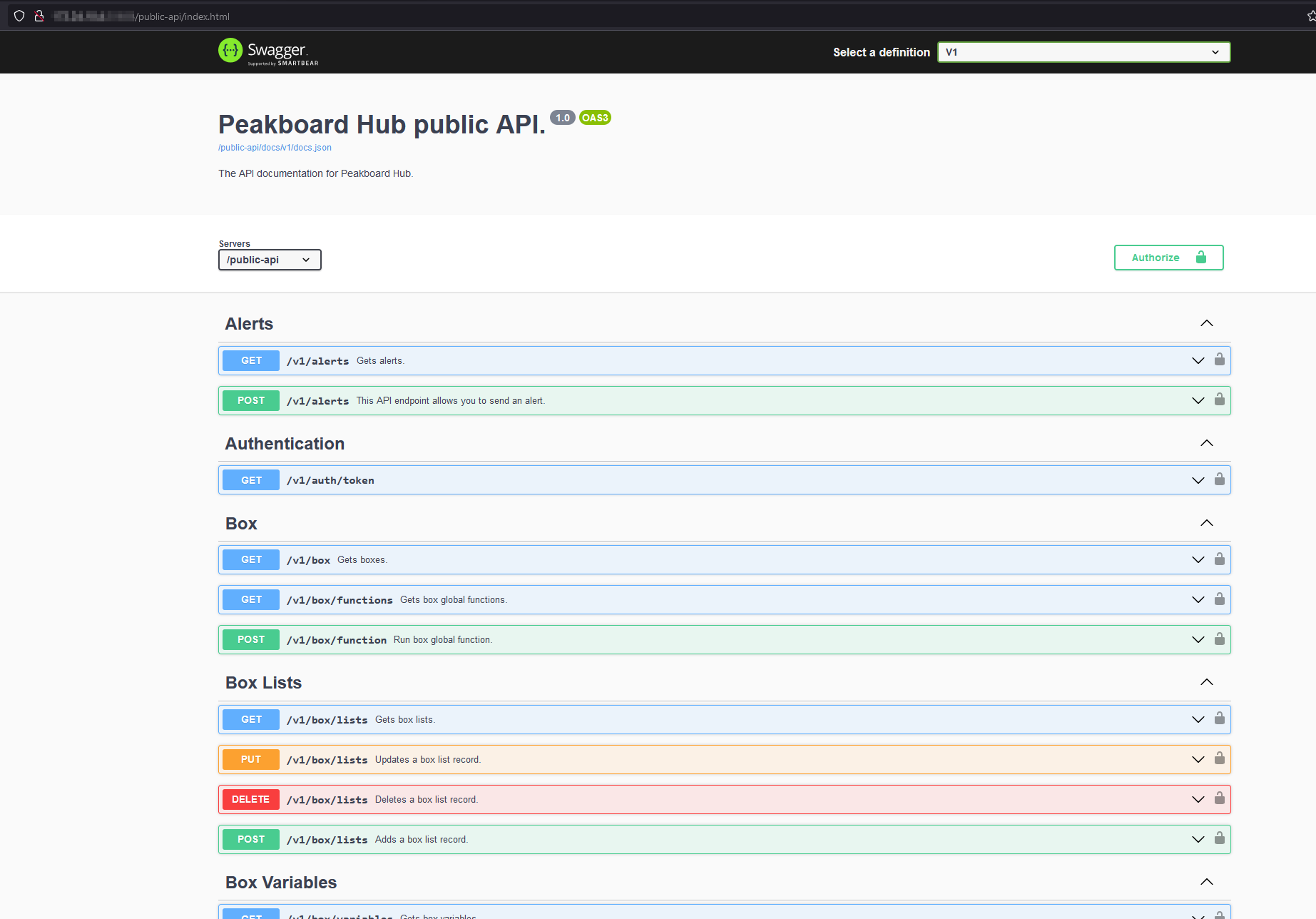
Peakboard Hub API is released with this version.
If the page is not displayed correctly the first time you open it, please empty the browser cache and reload it (usually: ctrl + f5)
General
[UI] - Updated the UI of the connections page to the new look and feel
[UI] - Updated the UI of the lists page to the new look and feel
[UI] - Updated the UI of the logs page to the new look and feel
[UI] - Updated the UI of the users page to the new look and feel
[UI] - Updated the UI of the alerts page to the new look and feel
[UI] - Added new variables page
[UI] - Improved mobile access
Setup - Added the Peakboard Hub API to the installer
Setup - Improved the Peakboard Hub installer
Boxes - Added runtime updates for box groups
Boxes - Added possibility to schedule runtime updates at specific daytimes
Boxes - Added possibility to define timeframes in which boxes are running
Boxes - Improved box groups, so that box group names can be changed
Boxes - Improved the error message, if the pbadmin was used to connect a box to the Peakboard Hub online
Boxes - Fix issues with uploading Peakboard applications
Boxes - Fix issues with setting a box time server
Boxes - Added error message when updating boxes which are too old
Lists - Added the possibility to define multiple filters at once
Lists - Added possibility to customize the width of the ID column
Lists - Added column restrictions and validation
Lists - Added column sorting when double clicking coloumn headers
Lists - Fixed issues with updating the default value
Lists - Fixed issues with importing lists
Lists - Fixed issues with lists sometimes throwing an column-name-error in the designer
Lists - Fixed issues with problematic column names for lists
[Variables] - Added variables to the Peakboard Hub
[Variables] - Added initial values for variables
[Variables] - Added the possiblity to bind variables to list cells
[API] - Added the Peakboard Hub API for third party access
[Log] - Fixed issue with warning log messages not beeing shown
[Database] - Fixed database update scripts for older database server versions
[Database] - Improved error messages for database issues
[Database] - Improved handling of unallowed characters in database passwords
Users - Added possibility to create API tokens for user groups
Users - Improved warnings for users leaving a company or demoting themselves
Users - Reworked permissions to be part of the user group instead of predefined roles per user
Improved caching for faster loading times
Added expiration time to invitation emails
1.20.1.0 (10.06.2024) Download
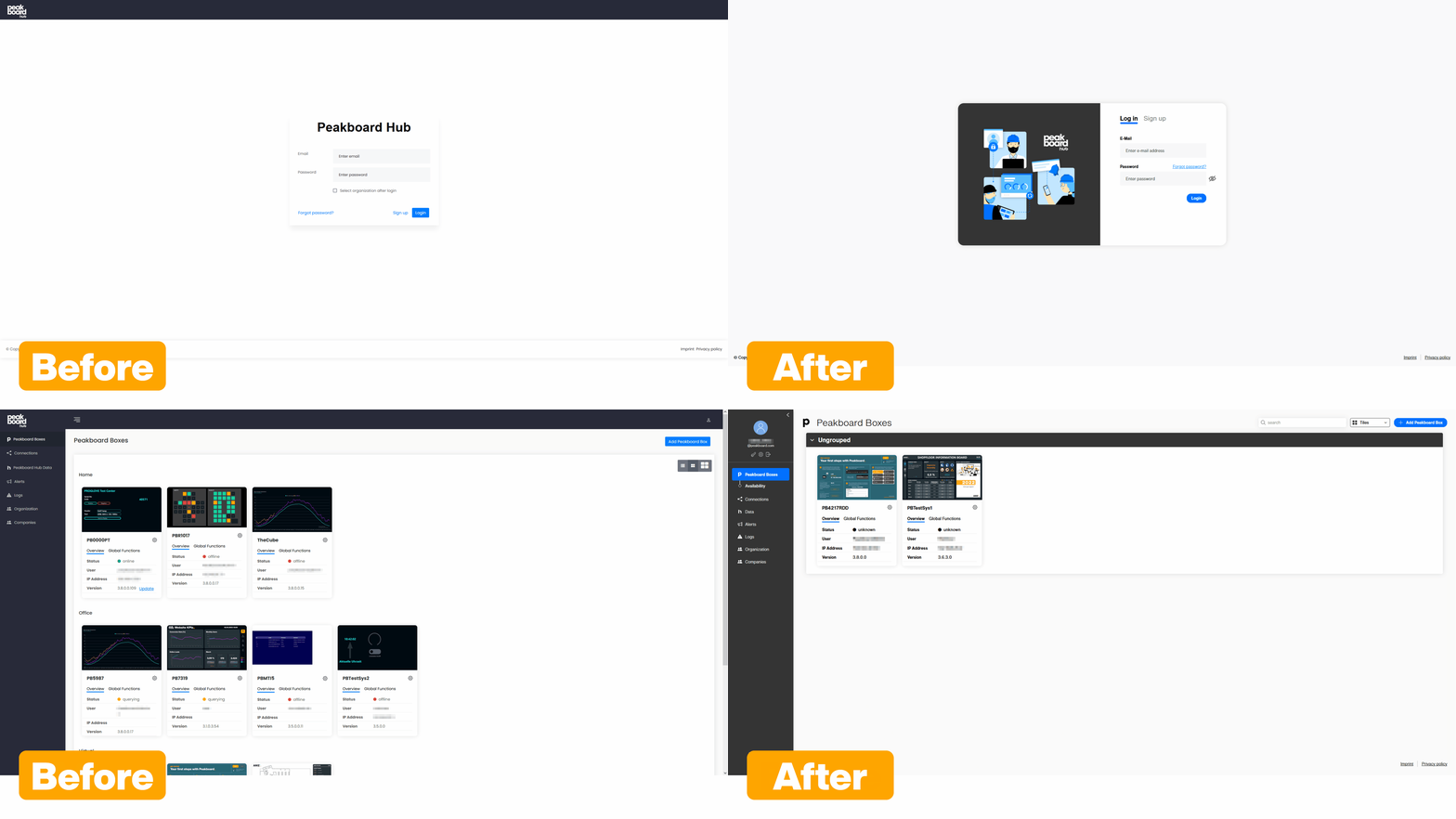
The graphical user interface of the Peakboard Hub on premise has been extensively revised in many areas.
General
Peakboard Boxes - Peakboard Box performance charts corrected
Peakboard Boxes - Added search bar for Peakboard Boxes
Peakboard Boxes - Improved manual addition of a Peakboard Box update file to the Peakboard Hub
Lists - Fixed issues with umlauts in CSV list exports
Lists - Fixed problems with renaming columns
Lists - Fixed sorting issue when adding a new row to a list
Lists - Added list import from CSV
Lists - Added possibility to sort lists by multiple columns
Lists - Added default values for columns when adding a new row
Users - Added user group based permissions for lists
Users - Added ability for users to delete themselves
Fixed issue with the use of ‘;’ in the Peakboard Hub database connection password
Invitation email updated
Update of the framework to .NET 8
Various UI updates (general appearance, some pop-ups, sidebar, Peakboard Box overview, login, some labels changed)
1.19.0.0 (07.02.2024) Download
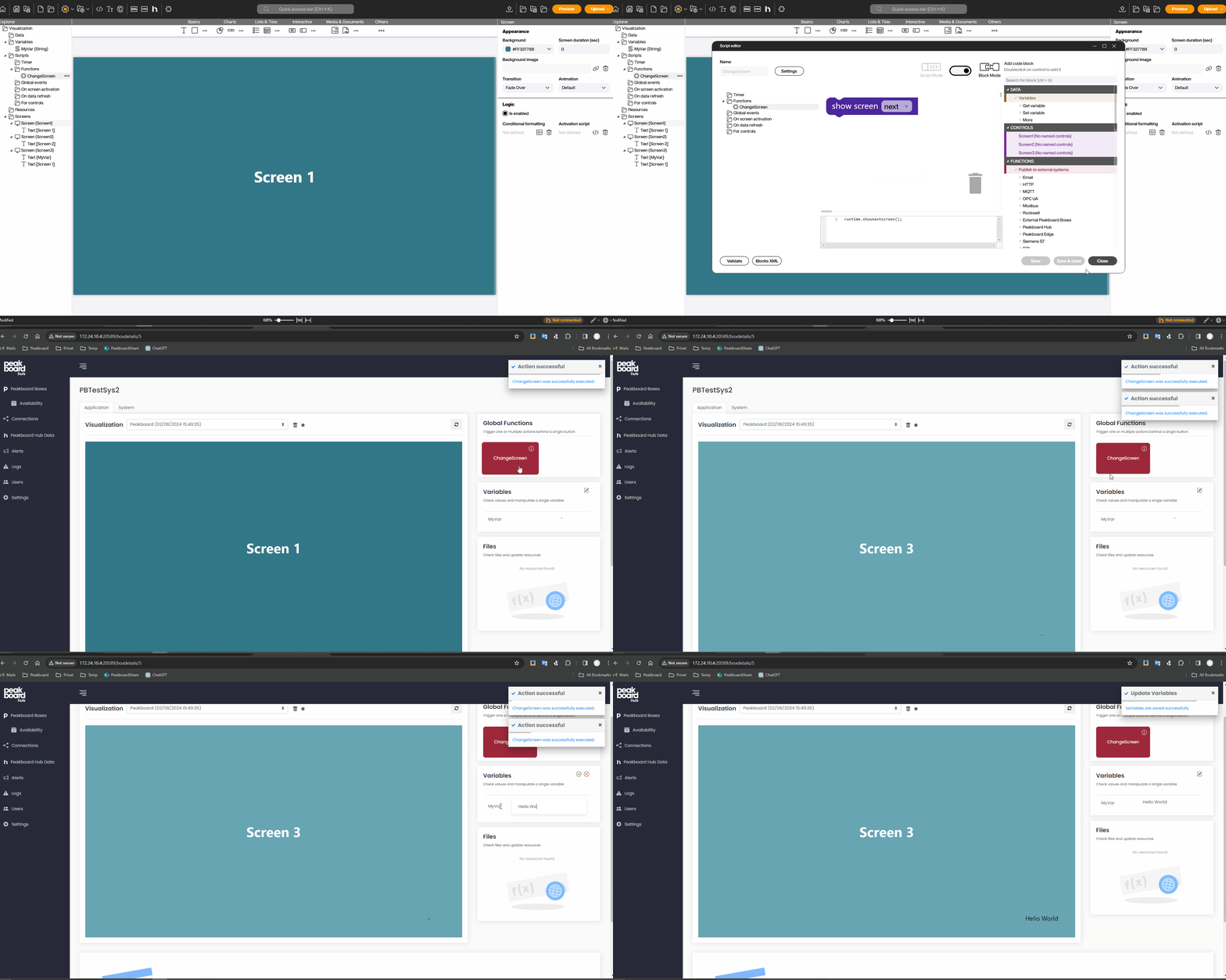
Control your applications on your Peakboard Boxes via the Peakboard Hub. The new option allows you to execute functions, change variables or lists or even upload files to your Peakboard Box via the Peakboard Hub.
General
[Web Access] - implemented to be able to control applications on Peakboard Boxes
User - UI Rework
User - Search implemented
Connections - Search implemented
Lists - Revision of the UI
Lists - Revision of the authorization system
1.18.1.0 (12.10.2023) Download
General
Lists - Fix for a bug where displayed tooltips could no longer be hidden
Lists - Fix for a bug that occurred when switching to another list during editing
Lists - Fix for a bug where only the currently displayed part was sorted instead of the whole table
Lists - Fix for a bug where drag-and-drop was accidentally activated in text fields when trying to select something
Lists - UI extensively reworked
Lists - Added option to sort lists by a column and save this setting in user preferences
Lists - List permission [change structure] added
Lists - Added several list functions that are stored in user preferences
Lists - Added detailed list permissions
Lists - Added scrolling option in list overview area to keep long list names readable
Lists - Lists are sorted alphabetically in the overview
User management - Fix for a bug where it was possible to create user groups with identical names
[Logs] - Fix for a number of bugs in the logs
[Alerts] - UI extensively reworked
Peakboard Boxes - Peakboard Box detail page can only be opened if it is currently available
1.17.2.0 (15.08.2023) Download
General
Menu icons revised
[Setup] - Use of an existing database allowed
[Setup] - Adjusted to the current Peakboard Designer setup
Lists - Fix for a bug where the display unintentionally automatically jumped back to the first page when editing a value
Lists - Fix for a bug where the display unintentionally changed the number of items shown when editing a value
Lists - Adjusted options for the number of elements displayed per page
Lists - Adjusted select statements for all read processes
[Logs] - Fix for a bug where the filters did not work properly
[Logs] - Added display of affected user and user group
User management - Fix for a bug where it was possible to remove own admin rights as the only administrator
User management - Fix for a bug where a user role was missing
User administration - Fix for a bug where it was not possible to add new user groups
User management - Added new permission [cloud communication]
User Management - Users can be manipulated if the Peakboard Box is added with a user with the appropriate role
Peakboard Boxes - Fix for a bug where Peakboard Boxes could not be deleted properly
Peakboard Boxes - Fixed height defined for screenshots
Peakboard Boxes - Detail view revised
1.16.0.3 (10.07.2023) Download
General
[Setup] - Fix for a bug where certificates were not installed correctly
[Setup] - Fix for a bug where an unnecessary error message was displayed
[Setup] - Fix for a bug where the [Cancel] button did not work
[Shared connections] - added SMTP transfer protocol
Fix for a bug where too many log messages were issued when a Peakboard Box was unreachable
Fix for a bug where the [Copy] button in the group key dialog did not work
Fix for a bug that occurred when the hostname was missing
Fix for a bug where it was not possible to use the [Set value] function for rows with a large ID
Fix for a bug where it was no longer possible to update Peakboard Boxes correctly
Fix for a bug where the Peakboard Box availability overview stopped working
Fix for a bug where the silent installation did not work anymore
Fix for a bug where deleting a user group while creating it resulted in an error message
Fix for a bug where the version of the Peakboard Boxes was not displayed correctly in the Peakboard Box overview
Limitation of log file size
Removed app connection
License and key generator added
New user role [Screenshot only]
Text fixes in the footer of the main window
Added date of upload in the dropdown list of visualizations
Added Peakboard Hub version display
Adjusted headings of the subpages