Peakboard hub
Version History
2.1.0.0 (24.11.2025) Download
Peakboard Boxes
Added a users tag to box log filters.
Added the ability to set upload-defined variables when deploying a Peakboard application to a box.
Added functionality to display changes in the box overview without reloading the page.
Added information about the currently logged-in user to box function calls.
Added user settings to Hub Flow output lists.
Updated the UI for configuring the time server on a box.
Updated the password policy for box passwords.
Updated the password-change process to align with Peakboard Runtime changes.
Improved the UI for empty states to better guide users.
Improved performance when loading boxes in the box overview.
Improved box loading behavior when encountering boxes with broken certificates.
Improved usability in the box overview by remembering the state of box groups.
Added a hint indicating when no Peakboard Runtime update file is available during a box update attempt.
Fixed an issue where the restart button was missing in the box overview.
Fixed an issue when deleting rows in variable lists on a box.
Fixed an issue that prevented calling box functions when parameters with regex constraints were used.
Fixed incorrect data types when calling functions with parameters.
Fixed various UI issues on the box details page.
Peakboard Hub Lists
Added a flag that allows empty values for string value constraints.
Added functionality to automatically apply the column constraint to variables created via the binding dialog.
Updated the UI to improve usability when working with lists.
Improved file structure when downloading list data as CSV.
Improved performance when loading lists on the lists page.
Fixed an issue that prevented appending data when importing list data.
Fixed several minor issues related to list handling.
Fixed an issue where hidden list columns reappeared after reloading the page.
Fixed issues where lists could fail to load due to invalid user settings created in older Hub versions.
Fixed an issue where loading list data via plain SQL could fail.
Fixed an issue where empty strings always passed regex constraint validation.
Fixed an issue where the permission to delete rows did not work correctly.
Fixed an issue where multiple quotation marks were merged into a single one when importing list data.
Peakboard Hub Variables
Added a flag that allows empty values for string value constraints.
Added the ability to change a variable’s data type and constraint.
Added functionality to display changes in the variable overview without reloading the page.
Added enforcement of constraints on remote data updates, including error messages for invalid values.
Improved the UI to better align with the Peakboard design.
Fixed an issue when updating values of string variables bound to a list.
File Manager
Added functionality to show differences for .pbmx files in the file manager version overview.
Improved icons for a better look and feel.
Fixed an issue where the file manager was unusable in some cases.
Fixed an issue when overwriting existing files that were not visible to the current user.
Hub Flows
Fixed an issue with aggregation steps in Hub Flows.
Fixed an issue with RSS feeds in Hub Flows.
Users
Added a button to manually delete user invitations.
Updated the UI for a better look and feel.
Fixed an issue where user groups could not be deleted in certain cases.
Removed the Screenshot Only access right to simplify user group configuration.
Settings
Added the possibility to manually upload a Peakboard Runtime update file from the user’s system.
Added a setting to automatically deactivate boxes that return an unauthorized error when contacted.
Improved the UI for adding a new license key.
General
Improved encryption of secure data stored in the Hub database.
Improved message box positioning for better usability.
Improved the expired-license dialog.
API
Added CSV as an output format for list data.
2.0.1.0 (09.07.2025) Download
Lists
Update of the ‘Clear list’ function to ensure that IDs continue to be assigned in ascending order and to standardize the function across all platforms.
Added warning messages for renaming or deleting columns to prevent accidental actions.
Added SQL Joins in Peakboard Hub Data sources for enhanced data manipulation capabilities.
SQL-Count issues with various data types resolved.
Other users working with the same hub list are now displayed to improve collaboration.
Added real-time changes in lists with multiple users, allowing updates to be reflected instantly.
Deleting lists has been improved. The list and all references are now deleted in a single transaction.
Fixed issue with lists having a column named ‘Order’ causing errors in the Peakboard Designer.
Removed the possibility of using ‘.’ symbol in list column names to ensure data integrity.
Fixed an issue with manually entering number values and clicking ‘enter’ to save.
Fixed UI issue, where the list value columns did not match the header columns.
Fixed issue, where unusable buttons would be shown in UI.
Adding a new list will now always return the correct ID.
Resolved error with entering number values outside constraints causing a bugged view.
Negative numbers cannot be used for the tick size in number constraints anymore.
Fixed bug where sometimes the wrong row could be deleted.
The rearrangement of columns is now retained as the user view.
Various UI improvements implemented.
User management
Enhanced email security by adding organization and group names to the password reset emails.
Enabled setting of box groups without the ‘Users’ access right requirement.
Improved search functionality for users in groups, ensuring accurate results.
Fixed issue with changing user group hub list column permissions.
Added possibility to create a new group key for a user group.
Connections
Completed UI rework to enhance user experience and streamline navigation.
Fixed issue with access rights for connections.
General
Changed collapse Icon position for increased consistency in user interfaces.
Updated address in the imprint to reflect the new address.
Highlighted icons on hover and added descriptive text to enhance clarity.
Removed unused packages to optimize system security, performance and efficiency.
Added a new endpoint to retrieve the current Peakboard Hub version.
Enhanced the license expired dialog to allow users to add a new license.
Fixed browser inserting entries into password fields for editing boxes in user groups.
Box management
Added the ability to manage Peakboard Boxes via Hub authentication for improved security.
Increased the maximum file size for uploading applications to boxes to 20 MB.
Fixed issue where ‘No global functions’ would be shown besides available global functions.
Prevented update button from appearing for boxes already on set version.
Resolved issue with editing users & roles on boxes.
Fixed issue with adding a box to the hub when no Box ID is set.
Fixed an issue where updating the IP address via the host name sometimes did not work correctly.
Fixed issue with global functions and number parameters.
Added setting to force hostname usage.
Added setting to block unencrypted communication over port 40404.
Fixed issues with exporting logs from Peakboard Boxes.
API
Scope ‘box:write’ is now necessary for executing global functions on a Peakboard Box.
Direct Hub <-> API communication added.
Corrected typo in JSON and improved JWT date expiration display.
The endpoint ‘POST /v1/lists/list’ now expects correct JSON as content.
UI
Updated style of Imprint and Privacy Policy.
Adjusted popup dialogs for better functionality on small screens.
Fixed missing distance between buttons for consistent layout.
Show the current system time alongside the timeserver of a Peakboard Box.
Fixed dropdown visibility issue when a box is in the last group.
Show the necessary hostname below the license.
Updated sidebar.
Reworked users page.
File management
Implemented first iteration of Peakboard Hub File management.
Added functionality for uploading .pbmx files to boxes.
Alerts
Implemented capability to create push notifications for alerts across multiple browsers and mobile devices.
Variables
Fixed issue with list cells displaying bindings from other user groups.
Hub Flows
Implemented first iteration of Peakboard Hub Flows to support headless applications on the hub.
1.21.3.0 (04.02.2025) Download

Peakboard Hub API is released with this version.
If the page is not displayed correctly the first time you open it, please empty the browser cache and reload it (usually: ctrl + f5)
General
[UI] - Updated the UI of the connections page to the new look and feel
[UI] - Updated the UI of the lists page to the new look and feel
[UI] - Updated the UI of the logs page to the new look and feel
[UI] - Updated the UI of the users page to the new look and feel
[UI] - Updated the UI of the alerts page to the new look and feel
[UI] - Added new variables page
[UI] - Improved mobile access
Setup - Added the Peakboard Hub API to the installer
Setup - Improved the Peakboard Hub installer
Boxes - Added runtime updates for box groups
Boxes - Added possibility to schedule runtime updates at specific daytimes
Boxes - Added possibility to define timeframes in which boxes are running
Boxes - Improved box groups, so that box group names can be changed
Boxes - Improved the error message, if the pbadmin was used to connect a box to the Peakboard Hub online
Boxes - Fix issues with uploading Peakboard applications
Boxes - Fix issues with setting a box time server
Boxes - Added error message when updating boxes which are too old
Lists - Added the possibility to define multiple filters at once
Lists - Added possibility to customize the width of the ID column
Lists - Added column restrictions and validation
Lists - Added column sorting when double clicking coloumn headers
Lists - Fixed issues with updating the default value
Lists - Fixed issues with importing lists
Lists - Fixed issues with lists sometimes throwing an column-name-error in the designer
Lists - Fixed issues with problematic column names for lists
[Variables] - Added variables to the Peakboard Hub
[Variables] - Added initial values for variables
[Variables] - Added the possiblity to bind variables to list cells
[API] - Added the Peakboard Hub API for third party access
[Log] - Fixed issue with warning log messages not beeing shown
[Database] - Fixed database update scripts for older database server versions
[Database] - Improved error messages for database issues
[Database] - Improved handling of unallowed characters in database passwords
Users - Added possibility to create API tokens for user groups
Users - Improved warnings for users leaving a company or demoting themselves
Users - Reworked permissions to be part of the user group instead of predefined roles per user
Improved caching for faster loading times
Added expiration time to invitation emails
1.20.1.0 (10.06.2024) Download

The graphical user interface of the Peakboard Hub on premise has been extensively revised in many areas.
General
Peakboard Boxes - Peakboard Box performance charts corrected
Peakboard Boxes - Added search bar for Peakboard Boxes
Peakboard Boxes - Improved manual addition of a Peakboard Box update file to the Peakboard Hub
Lists - Fixed issues with umlauts in CSV list exports
Lists - Fixed problems with renaming columns
Lists - Fixed sorting issue when adding a new row to a list
Lists - Added list import from CSV
Lists - Added possibility to sort lists by multiple columns
Lists - Added default values for columns when adding a new row
Users - Added user group based permissions for lists
Users - Added ability for users to delete themselves
Fixed issue with the use of ‘;’ in the Peakboard Hub database connection password
Invitation email updated
Update of the framework to .NET 8
Various UI updates (general appearance, some pop-ups, sidebar, Peakboard Box overview, login, some labels changed)
1.19.0.0 (07.02.2024) Download
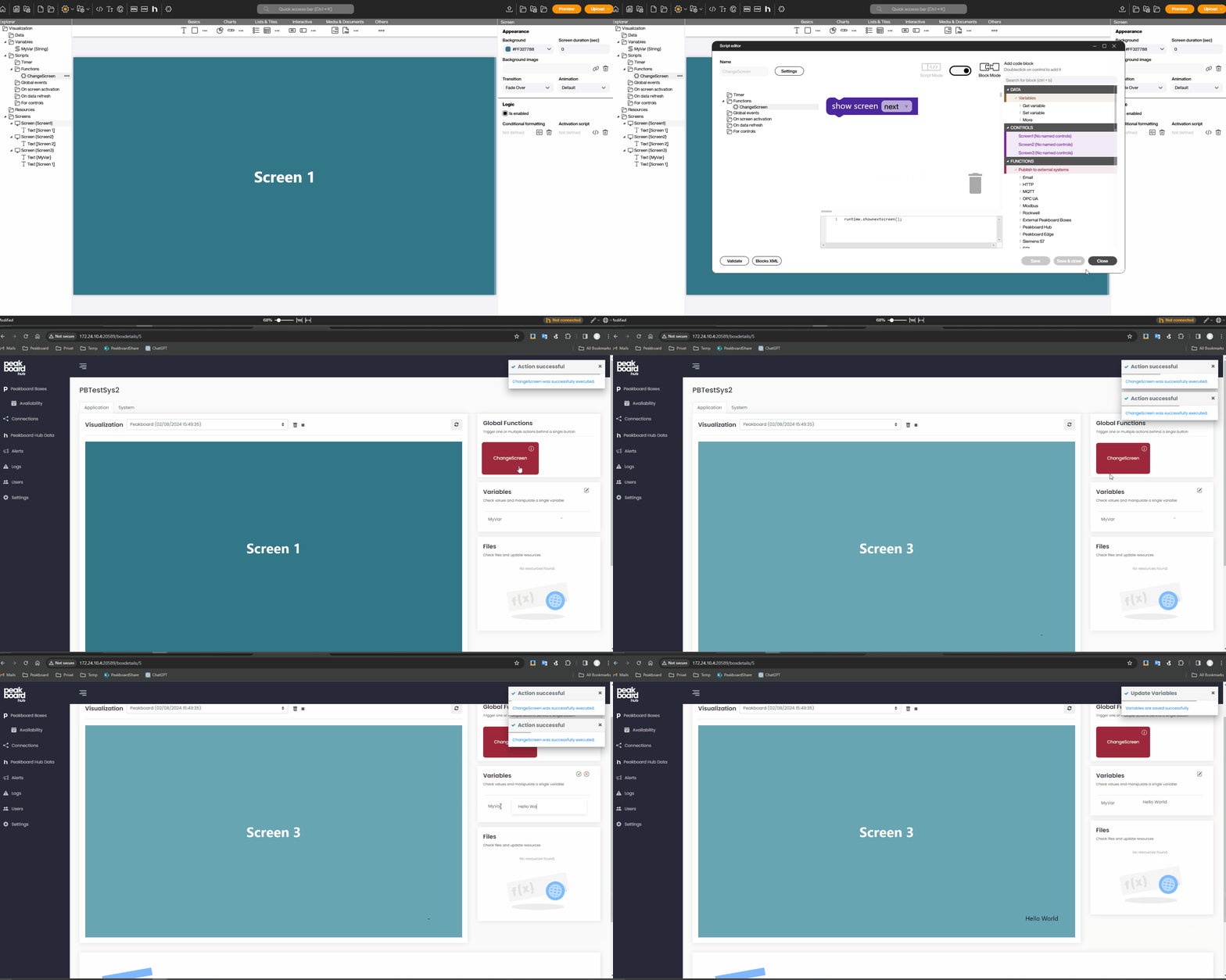
Control your applications on your Peakboard Boxes via the Peakboard Hub. The new option allows you to execute functions, change variables or lists or even upload files to your Peakboard Box via the Peakboard Hub.
General
[Web Access] - implemented to be able to control applications on Peakboard Boxes
User - UI Rework
User - Search implemented
Connections - Search implemented
Lists - Revision of the UI
Lists - Revision of the authorization system
1.18.1.0 (12.10.2023) Download
General
Lists - Fix for a bug where displayed tooltips could no longer be hidden
Lists - Fix for a bug that occurred when switching to another list during editing
Lists - Fix for a bug where only the currently displayed part was sorted instead of the whole table
Lists - Fix for a bug where drag-and-drop was accidentally activated in text fields when trying to select something
Lists - UI extensively reworked
Lists - Added option to sort lists by a column and save this setting in user preferences
Lists - List permission [change structure] added
Lists - Added several list functions that are stored in user preferences
Lists - Added detailed list permissions
Lists - Added scrolling option in list overview area to keep long list names readable
Lists - Lists are sorted alphabetically in the overview
User management - Fix for a bug where it was possible to create user groups with identical names
[Logs] - Fix for a number of bugs in the logs
[Alerts] - UI extensively reworked
Peakboard Boxes - Peakboard Box detail page can only be opened if it is currently available
1.17.2.0 (15.08.2023) Download
General
Menu icons revised
[Setup] - Use of an existing database allowed
[Setup] - Adjusted to the current Peakboard Designer setup
Lists - Fix for a bug where the display unintentionally automatically jumped back to the first page when editing a value
Lists - Fix for a bug where the display unintentionally changed the number of items shown when editing a value
Lists - Adjusted options for the number of elements displayed per page
Lists - Adjusted select statements for all read processes
[Logs] - Fix for a bug where the filters did not work properly
[Logs] - Added display of affected user and user group
User management - Fix for a bug where it was possible to remove own admin rights as the only administrator
User management - Fix for a bug where a user role was missing
User administration - Fix for a bug where it was not possible to add new user groups
User management - Added new permission [cloud communication]
User Management - Users can be manipulated if the Peakboard Box is added with a user with the appropriate role
Peakboard Boxes - Fix for a bug where Peakboard Boxes could not be deleted properly
Peakboard Boxes - Fixed height defined for screenshots
Peakboard Boxes - Detail view revised
1.16.0.3 (10.07.2023) Download
General
[Setup] - Fix for a bug where certificates were not installed correctly
[Setup] - Fix for a bug where an unnecessary error message was displayed
[Setup] - Fix for a bug where the [Cancel] button did not work
[Shared connections] - added SMTP transfer protocol
Fix for a bug where too many log messages were issued when a Peakboard Box was unreachable
Fix for a bug where the [Copy] button in the group key dialog did not work
Fix for a bug that occurred when the hostname was missing
Fix for a bug where it was not possible to use the [Set value] function for rows with a large ID
Fix for a bug where it was no longer possible to update Peakboard Boxes correctly
Fix for a bug where the Peakboard Box availability overview stopped working
Fix for a bug where the silent installation did not work anymore
Fix for a bug where deleting a user group while creating it resulted in an error message
Fix for a bug where the version of the Peakboard Boxes was not displayed correctly in the Peakboard Box overview
Limitation of log file size
Removed app connection
License and key generator added
New user role [Screenshot only]
Text fixes in the footer of the main window
Added date of upload in the dropdown list of visualizations
Added Peakboard Hub version display
Adjusted headings of the subpages